Monitoring and Uptime Alerts for Solo-Run Apps
Silent payment failures and unnoticed outages cost solo founders revenue they never knew they lost.

A solo-run app in 2026 sits inside a blind spot that neither enterprise monitoring tools nor doing nothing can cover. The tools built for this problem assume a team of engineers, while the founders who need them most are alone. This piece maps what monitoring actually matters for a one-person app, which tools fit that context, and how to get real alerts running in an afternoon.
Why solo-run apps sit in a monitoring blind spot
Enterprise monitoring was designed for teams. On-call rotations, multi-engineer dashboards, and incident runbooks all presuppose that more than one person gets paged when something breaks. A solo founder does not need an on-call schedule. What they need is a tool that tells them, quickly and cheaply, that the thing making them money has stopped working. That tool is harder to find than it should be, because the market has organized itself around the assumption that monitoring is a team sport.
The other side of the gap is newer. AI coding assistants and all-in-one infrastructure platforms have made it straightforward for non-technical founders to ship real, revenue-generating apps in minutes. Floot, an MCP-based builder, handles backend, database, and hosting as built-in infrastructure. The result is a growing population of production apps with real users who expect reliability, run by founders who have no DevOps background and no budget for enterprise tooling. The tools they build with have raced ahead. The tools for keeping those apps alive have not caught up.
What "your app is down" actually means for a one-person business
The Hacker News scenario is familiar to any founder who has launched something. Traffic spikes, the server runs out of memory and crashes, and the founder finds out hours later. By then the traffic is gone, and so are the signups. Uptrack uses exactly this framing to explain why 30-second checks matter. The window for converting a burst of attention does not reopen.
Then there is the SSL expiry scenario, which SecurityBot names as the number-one situation indie hackers face. A site shows security warnings to every visitor for hours before the founder learns about it from an angry tweet. Revenue stops, users lose trust, and the whole failure was preventable with a calendar alert set 30 days out.
The third failure is quieter and costs more. Stripe webhooks stop processing. Payment failures go unlogged. Refunds queue silently. Everything looks fine on the surface, but the revenue logic has stopped working entirely. A plain HTTP ping catches none of these app-layer failures. It returns 200 and reports all clear while your checkout has been broken for a week.
The three layers a solo founder actually needs to monitor
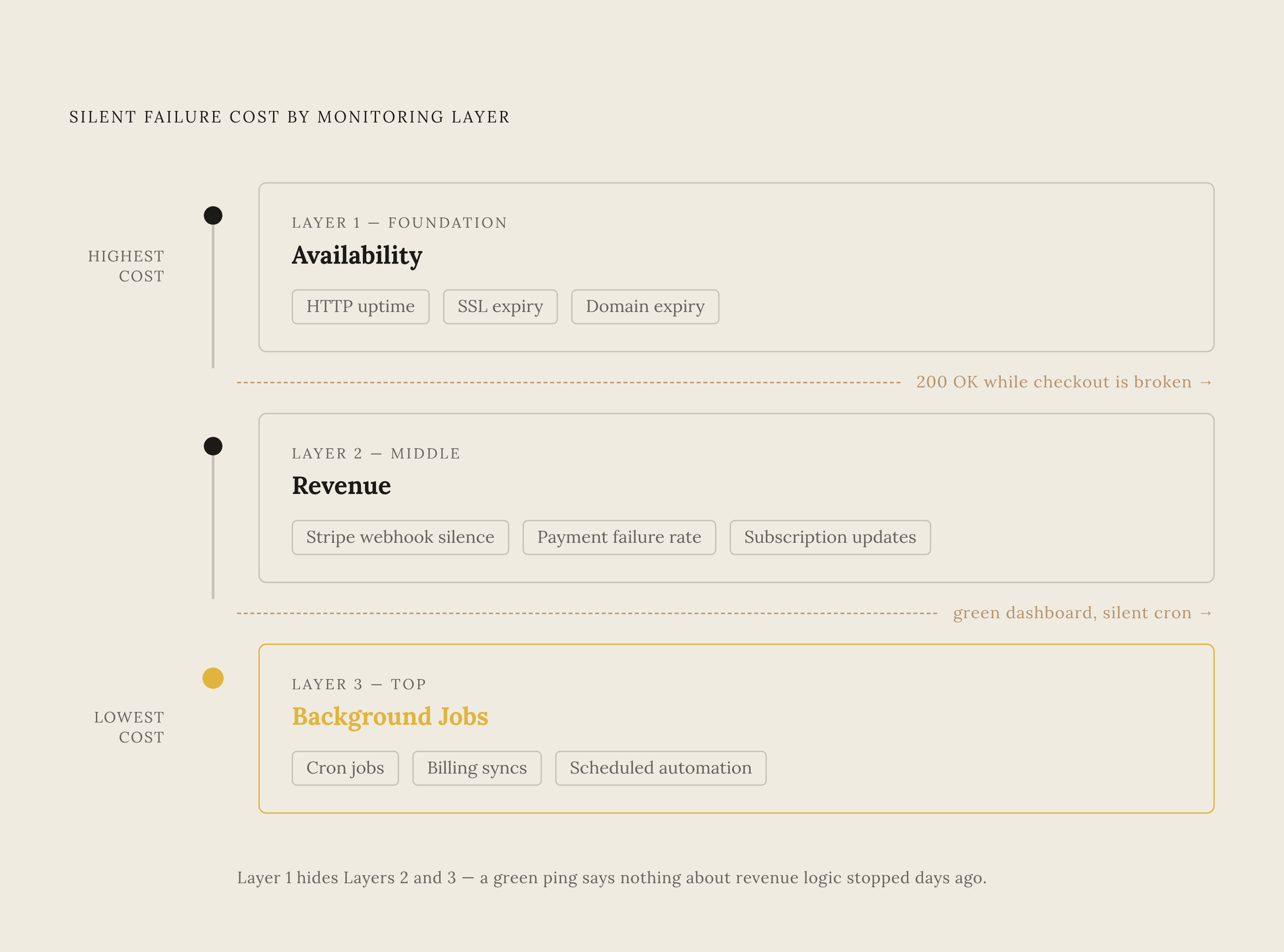
Solo founders need to watch three distinct layers. Conflate them and you either overspend on enterprise dashboards or under-protect what actually generates revenue. The layers form a progression: is it up, is it earning, is it doing its job in the background. Each layer is invisible to the one above it.
The first layer is availability. Is the app reachable at all? HTTP uptime checks, SSL certificate expiry, and domain expiry form the foundation. Multi-region checks matter here because a single-region ping can miss local DNS outages or region-specific failures. Status Page and rHealth both probe from multiple regions specifically to catch this.
The second layer is revenue. Are the workflows that move money still running? Stripe webhook silence, payment failure rate spikes, and subscription update failures all live here. But that only covers Stripe-side issues. It does not tell you when your webhook endpoint silently stops receiving events.
The third layer is background jobs and scheduled tasks. Are cron jobs, billing syncs, and automation workflows actually running on schedule? These fail silently by design. They produce no user-facing error. They just quietly stop doing their job. Uptrack monitors cron jobs, queues, and scheduled tasks as first-class checks, and flags jobs that are late rather than simply down.
How to sequence monitoring setup without wasting a weekend on infrastructure
The right order is revenue first, then availability, then background jobs. The silent failures cost the most, and the availability check is the easiest to add last. Week one starts with revenue protection. Wire up Stripe webhook silence alerts and payment failure monitoring before anything else. In that same first week, add HTTP checks on the checkout page, the login endpoint, and any public API, not just the homepage. The pages that move money deserve the same attention as the front door.
Week two covers background task monitoring. Add heartbeat checks on your billing sync cron job, email digest jobs, and any automation that runs on a schedule. Then set SSL and domain expiry alerts at 30 and 7 days out. A solo founder running a bootstrapped product should be able to complete this entire setup in under two hours and keep ongoing cost well under $50 per month.
Tools that fit a solo founder's budget and workflow
The right choice depends on which layer you are protecting and whether you want a managed dashboard, a self-hosted setup, or infrastructure baked into your build environment. Builders using MCP-based platforms that include infrastructure and integrations out of the box can skip the setup phase entirely and jump straight to monitoring. No environment variables, no endpoint configuration, no wondering whether your backend is even listening.
Floot is a full-stack app platform with an MCP connector that handles backend, database, hosting, authentication, recurring tasks, and email as built-in infrastructure. The scheduled tasks and webhook endpoints that most monitoring tools are watching are already managed rather than self-maintained. Pricing is flat, with no per-token markup and no DevOps sprint required.
For availability and SSL monitoring across multiple projects, Status Page fits the bootstrapped mold. Built by indie hacker Nikola Stojkovic specifically for indie hackers and bootstrapped teams, it exists because the founder was frustrated with enterprise pricing. Flat pricing starts at $15 per month with no per-seat, per-subscriber, or per-incident billing. A single account covers multiple products, which suits serial builders. Production-tested since 2019 and built on Go, PostgreSQL, and Redis, it comes with a 14-day free trial and no demos or contracts.
SecurityBot covers SSL expiry at 90, 30, 7, and 1 day before, uptime, security headers graded for CSP, HSTS, and X-Frame-Options, robots.txt changes, broken links, and domain expiry, all in one dashboard. A change that accidentally blocks Google indexing is the kind of silent failure a URL ping will never catch. It addresses the "separate tools for uptime, SSL, and analytics" frustration directly. It costs $5 per month for up to 7 sites, with a 14-day free trial and no credit card required.
Uptrack monitors background jobs, queues, and scheduled tasks as first-class checks rather than just HTTP endpoints. Check intervals run at 30 seconds, a status page is included, and plans start at $3 per month with a 30-day money-back guarantee. Setup takes about 60 seconds: enter a URL, pick alerts, done.
rHealth gives a generous free starting point. It offers 20 monitors free with no credit card and no trial expiration. The free tier includes Slack alerts, SSL monitoring, and full API access. Check intervals are 5 minutes on free, 1 minute on Pro, and 30 seconds on Business. rHealth explicitly names AI wrappers and LLM-powered products as a target use case, noting that they go down more than typical apps.
Self-hosted options deserve a fair mention. The trade-off is that its API is an internal Socket.io interface rather than a supported REST API, which makes monitoring-as-code workflows harder. It suits technically confident founders, but it is not the default recommendation for the non-technical solo founder this piece addresses.
Why MCP-connected monitoring changes the workflow for AI-native builders
If you build inside Claude, ChatGPT, or Cursor, monitoring tools that expose an MCP server bring incident response into the same conversation as development. The context switch to a separate dashboard disappears. Floot is itself an MCP connector, so founders building on it are already operating in an MCP-native environment. MCP-connected monitoring tools extend naturally into that same workflow.
OpenStatus is distributed under a copyleft open-source licence with more than 9,100 GitHub stars. Its MCP server exposes 19 tools, or 23 on workspaces with incident management enabled, grouped across status pages, status reports, maintenance windows, incidents, monitors, response logs, notifications, private locations, audit log, and documentation. In an active incident thread, you can ask the OpenStatus agent to draft a status report, approve it, and it publishes without opening the dashboard. The MCP server and API access are included in a 14-day Starter trial with 20 monitors and no credit card required, and on the Business plan and above. Paid plans start at $30 per month. OpenStatus also serves as an uptime monitoring engine probing from 28 regions across three cloud providers. Its MCP server provides 17 monitoring tools and is available on every paid plan from Solo upward.
A new monitoring category has emerged around MCP server health checks themselves. An MCP server health check is not a plain HTTP ping. It speaks JSON-RPC, runs the spec-defined handshake, and confirms the server actually exposes the tools it promises. OpenStatus runs this handshake on a schedule from 28 regions and alerts when the initialize call starts failing, tools/list comes back empty, or the protocol version shifts. Those are the failures AI clients hit first and report last. OpenStatus offers the health check as a free tool. For founders building MCP-connected apps, it is the availability check that matters most.
The case against stitching together a dozen monitoring tools
The strongest version of the self-hosted argument deserves a fair hearing. A full indie stack, a VPS running Uptime Kuma, Netdata, and a custom Stripe anomaly detector, can run at zero marginal cost for a founder already paying for a VPS. Setup takes roughly 15 to 40 minutes, and the founder owns all maintenance forever. Engineering time spent on monitoring infrastructure is engineering time not spent on the product.
The pricing model matters just as much as the tool quality. Per-seat pricing costs nothing at one user but scales badly as a team grows. Per-monitor pricing costs more as infrastructure grows. Flat-rate pricing is the most predictable model for a bootstrapped product. Status Page at $15 per month and SecurityBot at $5 per month for 7 sites both follow the flat-rate model.
The consolidation argument cuts deeper than dollars. The integration between them is another thing to maintain. The same argument that makes an all-in-one infrastructure platform smarter than stitching together Stripe, AWS, a hosting provider, and an email service applies to monitoring. Fewer moving parts means fewer things to break and fewer things to watch.
A practical starting setup a solo founder can complete today
A solo founder with a live app can have meaningful monitoring across all three layers running within two hours and well under $50 per month. The principle that guides every choice is simple. Spend one afternoon on this, pick flat-rate tools, and get back to building. Monitoring should protect the product, not become one.
If you built on Floot, start by confirming that your recurring tasks and Stripe integration are configured through Floot's built-in infrastructure. The managed layer handles what most monitoring tools are watching. Then add an external uptime check on your public-facing URL and a status page for user-facing transparency. The revenue layer is already covered because Stripe integration runs through Floot's hosted layer rather than an endpoint you maintain yourself.
For availability and SSL, start a free trial on Status Page at $15 per month flat, or SecurityBot at $5 per month for up to 7 sites. For background job and cron monitoring, Uptrack starts at $3 per month with 30-second checks and heartbeat monitoring. Upgrade when you need 1-minute or 30-second checks.
For revenue-layer visibility, enable Stripe's native health alerts. Every user gets entry-tier alerts for 402 and 500 errors automatically. Add a webhook silence alert through whichever tool handles your background job monitoring. If you build inside Claude or Cursor, consider OpenStatus for its MCP server. The 30-day trial includes 100 monitors and requires no credit card, and the Business plan and above includes the MCP server and probes from 28 regions. Start with revenue protection, add critical uptime checks on the pages that move money, then cover background jobs and expiry dates. Two hours of setup is enough to close the blind spot that solo-run apps have lived in for too long.