Customer Support Automation Stack for Solo SaaS Founders
AI handles repetitive tickets so founders can focus on customers who actually move the business.
Maor Shlomo, founder of Base44, built a customer support bot. It worked, but he shut it down, because reading tickets himself was how he stayed close to his own product. That's the honest starting point for any conversation about support automation: it works, and it still costs the founder something to give it away entirely. It's normal now for solo founders to run real revenue without employees, but the support inbox is usually where that model starts to crack first. Code gets written once. Marketing can run on autopilot for weeks. Support doesn't work that way: every new customer adds tickets, no matter how smooth everything else runs, and those tickets expect an answer now, not next week. The fix is getting the AI to handle the repetitive stuff, so the founder's attention goes to the handful of conversations that actually move the business.
What a support automation stack is
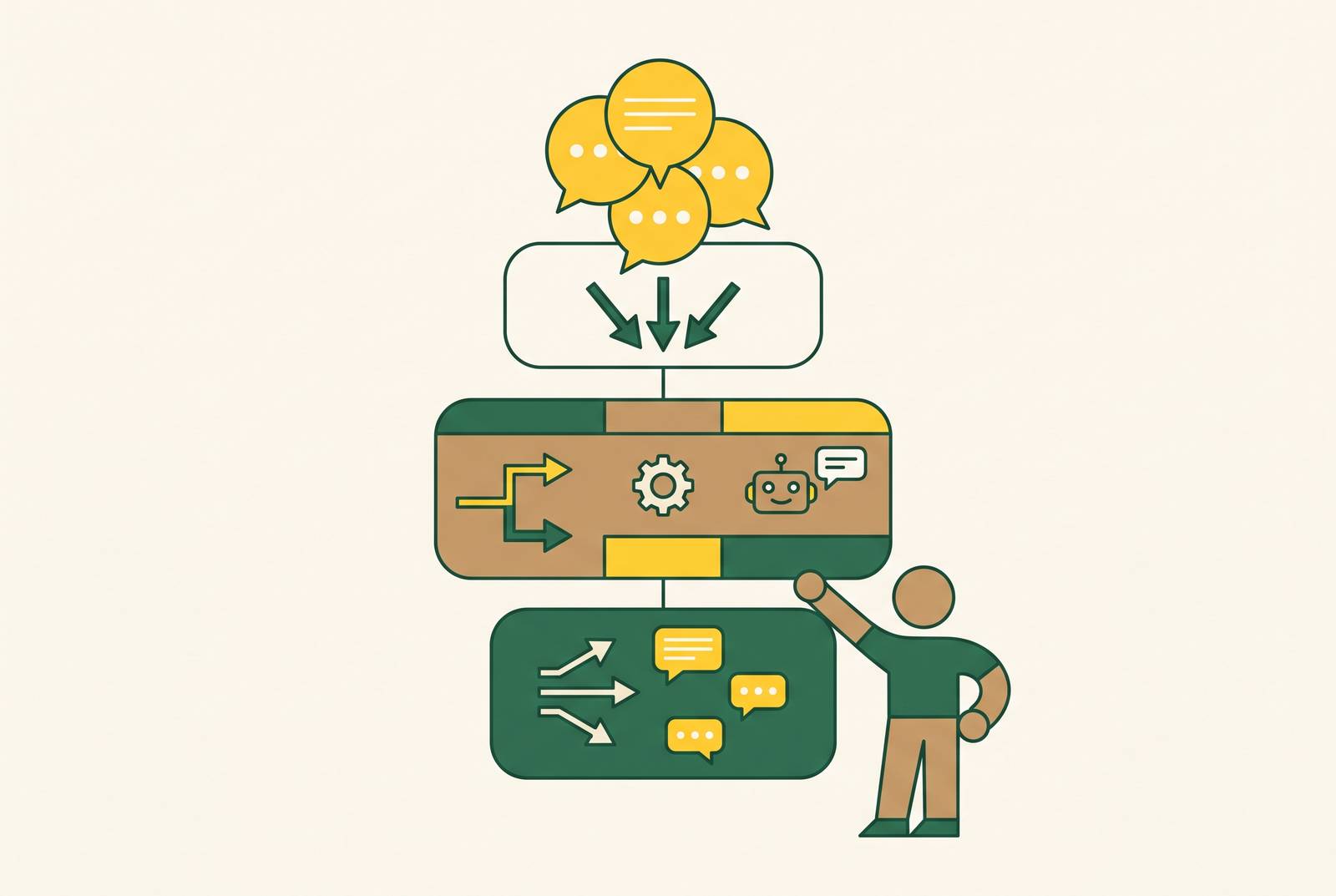
The real question is what system needs to get built, not which support tool to buy. A solo founder's support setup is five layers working together: triage, a knowledge base, auto-response, escalation, and notifications. Triage sorts and ranks what's coming in. The knowledge base is what the AI actually pulls answers from. Auto-response closes out tickets start to finish. Escalation sends the hard ones back to the founder. Notifications let the customer know what happened. Skip triage, and auto-response fires at the wrong tickets. If the knowledge base goes stale, auto-response gives you wrong answers. If escalation is built badly, the founder either misses the tickets that matter or ends up reading everything anyway. One piece of infrastructure ties these layers together in 2026: MCP, the Model Context Protocol, an open standard Anthropic built in November 2024. MCP lets AI tools talk to outside platforms through one shared interface, so the AI a founder already uses, whether that's Claude, ChatGPT, or Cursor, can plug straight into a support platform without custom code. For support specifically, that means a founder can triage tickets, draft replies, and pull up thread summaries from inside the same AI chat window they're already working in, instead of logging into a separate app for every task.
Layer one: triage, sorting the queue before anything else touches it
Triage comes first because a mistagged ticket poisons everything downstream. If you point an auto-responder at the wrong kind of ticket, it burns credits and annoys the customer. Leave an urgent bug report untagged and it sits buried in the queue while the customer gets angrier by the hour. Good triage reads each incoming ticket, assigns it an urgency level, tags it by type (billing, bug, how-to, feature request), and routes it, all before anyone drafts a reply. Shlomo's approach is a useful model here: he built AI agents that sift through user feedback, surface product ideas, flag UX problems, and send the right signal to the right place. Apply that same logic to a support queue and you get triage. Whatever tool handles it, the rules need to be written down: what counts as urgent (a paying customer versus someone on a trial, a bug versus a simple question), how tags get applied, and when something escalates. If you skip the documentation, the system drifts as ticket volume grows, because the AI has nothing consistent to follow.
Layer two: the knowledge base, the source the AI draws on for every answer
An auto-responder is only as sharp as what it's reading from. When the knowledge base stays current and well organized, you get an actual resolution, a ticket closed and a customer satisfied, instead of a response that sounds right but still ends up escalated. That knowledge base needs to hold the product docs, the FAQs, the common troubleshooting steps, the billing policies, and a set of past resolved tickets to learn from. Together, that's the entire pool of answers the AI has to work with. What made deflection reliable in 2026 wasn't a smarter model. It was better retrieval over documentation founders already had. Repetitive tickets, billing questions, "how do I" requests, basic setup errors, now get handled well because retrieval over a founder's own docs finally works at a level worth trusting. The cost that sneaks up on founders is the hours spent keeping that documentation current, and that cost climbs as the product and its docs grow. The bar to clear is simple: cover the ticket types that need autonomous resolution. Anything missing from the knowledge base will escalate, and that's fine. Covering the repetitive majority is the goal, not covering everything. Getting a baseline in place is fast: Chatbase can ingest a docs URL and be live in under 15 minutes, using documentation that already exists rather than requiring anyone to write new content. What you load into that knowledge base sets the ceiling on what layer three, auto-response, can do.
Layer three: auto-response, the tools that resolve tickets without the founder
Picking an auto-response tool comes down to two numbers: how fast it delivers value, and how much it costs at the floor. Feature lists matter less, since a solo founder's scarcest resources are time and money, not a longer checklist of capabilities. It helps to separate what "AI support" actually means in 2026, because the term covers three different jobs. Deflection means the AI resolves the ticket completely and the customer never reaches the founder's inbox. With drafting, the AI writes a reply, but the founder still has to approve it. With routing, the AI tags and prioritizes, but the founder still answers every ticket by hand. Only deflection gives the founder back real hours. So with drafting and routing, a human still has to review every ticket.
Chatbase is the fast end of that spectrum for getting a knowledge base live, and its flat pricing avoids the surprise-invoice risk that usage-based tools carry. Help Scout is usually running within one to two days, and it combines a real shared inbox with AI Answers, its autonomous resolution feature. Intercom with Fin typically takes one to three days to get running, and it handles complex, multi-turn conversations especially well. Usage-based pricing means a traffic spike can produce a bill nobody budgeted for. There's also a structural risk: Salesforce signed a definitive agreement on June 15, 2026 to acquire Fin, formerly Intercom, for roughly $3.6 billion, so founders should expect pricing and positioning to shift as that deal closes. Plain also takes one to three days to set up, and it runs $45 a month annually for one seat, with its Ari AI agent included and no per-resolution fee, just a credit model instead. It's built specifically for developer-tool companies whose customers reach out over Slack, Microsoft Teams, Discord, email, and in-app chat, and its MCP server is the standout feature: triage and replies happen from inside Claude or ChatGPT without switching tools. But full AI Agent resolution only kicks in on the Plus plan at $295 a month per workspace, which is a steep jump for a solo operator unless Crisp is already the inbox of choice. Pylon should be skipped at this stage: its effective AI floor runs $267 a month at base ($417 with AI Assistants), and it's built for B2B teams running Slack Connect support, not solo founders. Zendesk should also be skipped: Suite Team starts at $55 per agent per month with AI agents included (five free automated resolutions per agent monthly, overages billed per resolution), but it carries enterprise-level complexity that outweighs its value for one person.
The pricing structure itself carries risk. Two real cases show what this looks like in practice. At VideoCompress.io, running $25K MRR with 800 customers, Intercom's Fin resolved 78% of tickets entirely on its own, including refunds, plan changes, and API troubleshooting, cutting weekly support time from 25 hours to 4, with an average monthly Intercom bill around $180 once usage-based Fin charges were factored in.
Layer four: escalation, designing the path for tickets the AI shouldn't touch
Escalation is the designed handoff that makes the rest of the stack worth trusting, not a fallback for when automation fails. A clean escalation carries the full conversation history, shows the customer's account status, already has an urgency tag from triage, and explains clearly why the AI couldn't close it out. That way the founder spends time making a decision and replying, not digging through old messages to figure out what happened. The criteria for what escalates should be spelled out in advance: a paying customer reporting a bug, a complaint that's sat unanswered past a set window, a ticket where the AI's response got marked unhelpful, or anything the AI flags as outside what its knowledge base covers. Shlomo tunes his stack well enough that the AI handles roughly 80% of requests on its own, leaving a queue of 5 to 6 escalated tickets each morning. At that point, escalation becomes a daily routine instead of a constant interruption. The founder's job in that queue is noticing what the AI couldn't handle and feeding that gap back into the knowledge base, which closes the loop with layer two, not only answering those tickets. MCP changes what that morning routine feels like, too: through Plain's MCP server, a founder can read escalated threads, see full context, and draft a reply from inside the same AI client used for everything else, so reviewing escalations becomes part of one workflow instead of a separate app to open.
Layer five: notifications, closing the loop with customers after resolution
A ticket the AI resolves without telling the customer is still an open loop from the customer's side, no matter how cleanly it got closed on the back end. Notifications cover three jobs: confirming resolution automatically when the AI closes a ticket, acknowledging an escalation so the customer knows a human is now looking at it, and sending proactive updates when a known bug or outage is hitting multiple customers at once. This layer connects straight into broader email automation: tools that trigger on support events, a ticket unresolved after 24 hours, the same customer reaching out three times, a billing issue flagged, shift the founder from reacting to getting ahead of problems. Indie SaaS founders often lose revenue after the first payment, because they treat lifecycle email as a marketing job, separate from support entirely. If you wire Stripe events (a failed payment, an upcoming renewal, a plan change) into the notification layer, you close that gap without adding another tool. Notifications double as an early churn warning. A customer who contacts support three times in a month without getting resolved is showing a clear sign they might cancel, and a system that catches that pattern and flags it for the founder catches the churn risk before it turns into a lost customer.
How to wire the layers together without building a fragile integration patchwork
Connecting five layers can trade one time sink, the ticket queue, for another: broken automations, mismatched data, and tools that quietly stop talking to each other. The goal is the fewest connections between the fewest tools possible. For a solo founder, one platform that does most of this well beats five specialized tools stitched together. A best-of-breed helpdesk's extra depth rarely covers what it costs you to integrate it, the mental overhead of switching between tools, or the automations that break the moment one of those five systems changes something. When some glue between tools is unavoidable, that glue adds ongoing maintenance cost and new points of failure between the tools it connects. Make.com offers another entry point: its Core plan gives 10,000 operations for $9 a month annually, so it's worth considering if a founder already knows Make's interface. The practical setup for most solo founders comes down to four connections: one inbox tool handling triage and escalation routing, one deflection layer pointed at the knowledge base, one automation trigger firing escalation notifications, and MCP as the interface for reviewing and responding to everything. Four connections to maintain, not fourteen.
The objection worth taking seriously: what you lose when the AI handles support
Support tickets are product intelligence, so when a founder stops reading them, they lose a direct line into what's actually happening with the product. Shlomo's experience is the clearest proof of that cost: his bot worked, and he turned it off anyway, because going through tickets himself was how he stayed connected to what his users were actually running into. That's an argument for building the escalation layer on purpose: let the AI handle billing questions, "how do I" requests, and basic troubleshooting on its own, and let the escalation queue surface the edge cases, the frustrated customers, and the feature requests the founder actually needs to see. There's a second cost to name, too. The test for whether a stack is working is simple: if the escalation queue is full of billing questions and password resets, the knowledge base needs more work. But if it's full of product edge cases and power-user requests, the stack is doing its job. The AI doesn't need to answer every question. It needs to handle the repetitive ones, so the founder's time goes toward the conversations that actually move the business forward, and then the escalation queue stops looking like a failure pile and starts working as the product-intelligence feed it actually is.